Description of problem: Sometime recently (~Nov 12) the web uploader started adjusting the timestamps of photos I upload that were taken in a different time zone. For instance, taken in California but posted from New York. The photo linked above was taken at 11:50 AM PDT, the DateTimeOriginal value in the exif data is 11:50 AM, but the time saved in the observation is 2:50 PM PDT. It’s as if the time was extracted from the image, a PDT timezone was attached based on the location, but then it was converted to EST (where I am now) but still saved as PDT.
If I try reposting a photo I uploaded before this started, I see the same thing suggesting that something changed on the inaturalist side.
(I know there’s an offset slider on the upload page but the timestamps in the photos are already correct, and the fact that this behavior changed recently seems like a bug in itself).
EDIT: sorry, i read this as being an observation in New York, but it looks like the observation is still in California. so if the photo was timestamped with a California time, then the time of the observation should match the timestamp, and if it doesn’t, then it does seem like there is a bug somewhere.
I did some more digging and think I figured out what’s going on here. Here’s a small example photo I’m using to test (not sure if forum software will preserve exif tags or not (edit: looks like it doesn’t)):
The exif library previously used, piexifjs, returns a DateTimeOriginal of 2025-08-18 10:54:55. Looks right. The new library, ExifReader, returns something different: 2025-08-18T10:54:55-07:00. Somewhere internally it’s parsing the raw EXIF datetime and combining it with the OffsetTimeOriginal. (I don’t know why it would do this, but it appears to do so for all photos from my camera but not from my phone.)
The extracted time then gets parsed using the moment-timezone library, formatted using inat’s parsableDatetimeFormat (which intentionally excludes the time zone offset), and finally saved in the observation metadata. This parsing+formatting is where the bug shows up. When parsing times without an offset, moment treats them as in the user’s local time, which is fine since the formatted time will always just match the input time. But when there is an offset, moment converts it into the user’s local time, resulting in a formatted time that appears to have been adjusted. See this docs page for more.
My recommendation would be for inat to either switch back to the previous exif library which seems to preserve the original tags better, or if that’s not an option then check whether the extracted DateTimeOriginal contains an offset and if so either remove it or parse it with moment.parseZone instead.
All the relevant data for the example photo:
piexifjs DateTimeOriginal: 2025:08:18 10:54:55
moment parsed time: 2025-08-18T10:54:55-04:00
moment formatted time: 2025/08/18 10:54 AM (good!)

ExifReader DateTimeOriginal: 2025-08-18T10:54:55-07:00
moment parsed time: 2025-08-18T13:54:55-04:00
moment formatted time: 2025/08/18 1:54 PM (wrong!)

moment using parseZone: 2025-08-18T10:54:55-07:00
parseZone formatted: 2025/08/18 10:54 AM (good!)
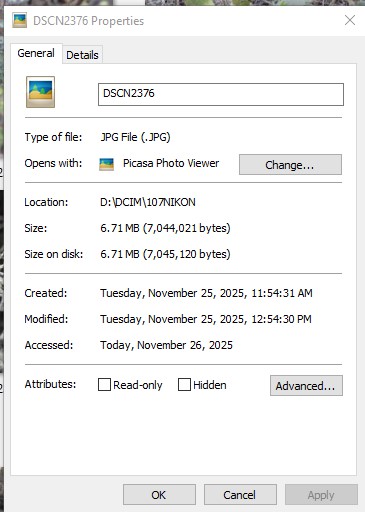
I think my issue is related to this. I just noticed that I’d had my camera time off by an hour during my last outing, so I bulk-edited the file times an hour back to correct it.But when I went to upload them, they are uploading with absurdly wrong times.
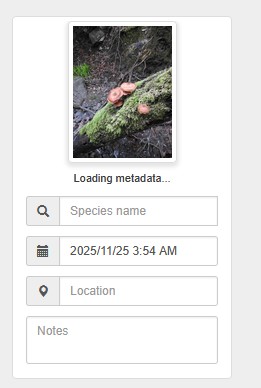
This mushroom, for example, is uploading as 3:54 AM, while the actual file shows the correct time of 11:54.
Oddly, when I first started uploading these, about 20 minutes ago, only SOME of the times were off. I cancelled the upload while I tried to figure out what was going on, and now when I upload those same files, ALL of the times are affected.
I’m resorting to uploading them with the date only and removing the time entirely, but I really hope this gets fixed soon!
@jfmantis@graysquirrel Are you able to email a few photos as attachments or via something like google drive to help@inaturalist.org so I can take a look? And let me know what the correct time and time zone should be.
I actually went through and fixed all my affected photos except the one I linked in my original post; interestingly all I had to do was click “Sync?” on each photo on the observation edit page, which suggests that the code responsible for that is separate from the web uploader and not affected by this bug.
Thanks for sending your photos and for the detailed info, @jfmantis and @graysquirrel, I made a bug report. It’s definitely related to the device’s current time zone, and I think in the case of graysquirrel’s photos, iNat is resorting to UTC as the default time zone since her photos lack time zone metadata, then subtracting 8 hours as she’s in California.
OK, this has been fixed. @jfmantis and @graysquirrel, your photos are looking good, and I also tested some of my own photos from other time zones and changed my device’s time zone and it all looks good to me in the uploader.