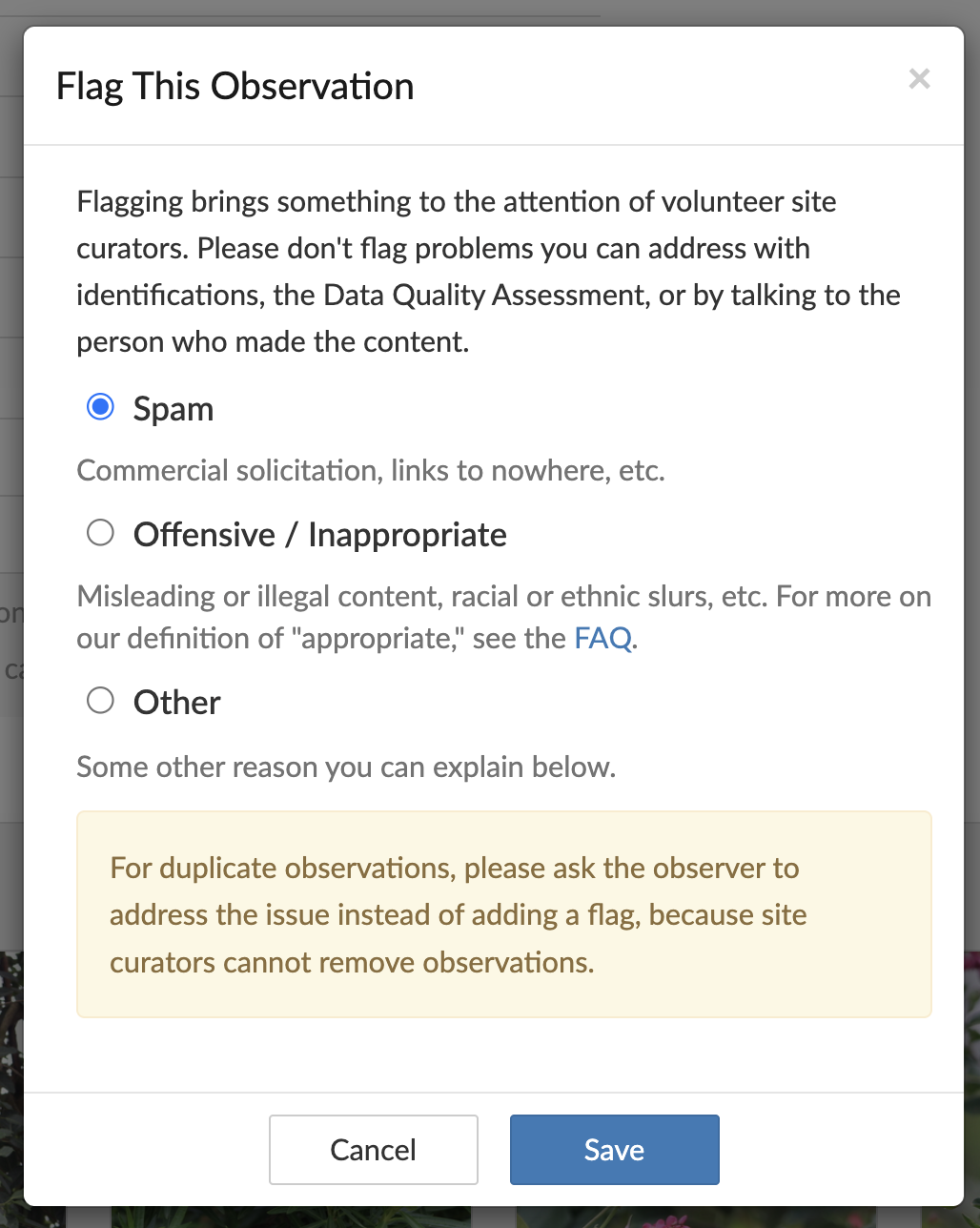
Step 1: Click “flag as inappropriate” on an observation (not media, the whole observation)
Step 2: Select “Other” as the flagging reason
Step 3: Notice that the “Save” button is cut off the bottom of the screen, making it impossible to submit the flag. It appears that when AI was added as a flagging reason, it pushed the bottom of the flagging popup below the bottom of the screen, leaving the “Save” button inaccessible. This is only a problem when flagging observations, when you flag media or comments the paragraph about duplicate observations is not present, making the popup small enough that it still fits.
The screenshot is of me flagging myself so that I am not calling out any user
Edit: The button doesnt show in your screenshot???
It works in Edge with and without reason specified. Thought it’s because you didn’t type it in yet but the button even works when nothing got filled in, which seems weird.
Shouldn’t it be correct to be greyed out? I thought you’d need to type something.
Anyhow: I can’t reproduce
Firstly, the dialog isn’t rebuilt properly before it’s re-shown. To see this, open a fresh observation and click on a photo flag to bring up the five-option dialog. Then cancel it and click the flag link at the bottom of the page. You should now see the same five-option dialog, only with “Flag This Observation” at the top.
Secondly, there’s a design flaw affecting all dialogs on the site, which creates an accessibility issue. Some people need large fonts to see all the content properly, which effectively reduces the size of the browser’s viewing window. If there are elements on the page with their overflow css property set to “hidden”, this can result in inaccessible content (which is the problem being reported here). To see this, open a flag dialog and either resize the browser window smaller, or increase the zoom. At some point, the bottom of the dialog will be cut off and become inaccessible (because scrolling has been disabled). AFAICS, there’s no practical reason why the page should force this behaviour, so it seems like a pretty clear design flaw.
It’s worth doing a little experiment to see how things should work. To try this in Firefox, start with a fresh observation in a normal browser window, and open a flag dialog. Then open the web developer tools, click on the inspector tab, and use the selector tool (top left corner) to select the greyed out backround element on the page. Now go to the rules tab in the side-bar on the right, scroll down a little until you see overflow: hidden, and change its value to “auto”. After closing the web developer tools and resizing the window or zooming, you should now get a normal scroll bar which makes the whole dialog accessible.
PS: I only tested using Firefox 143.0.3, but I assume similar issues will occur in other browsers.
I was going to type out a long comment but @bazwal already summarized it better than I could!
I can reproduce the issue in Firefox by:
set the zoom to 120%
open flag dialogue on a photo
cancel photo flag window
scroll down and open observation flag instead
This brings up a 5-option flag menu with the button cut off by the bottom of the screen and no way to scroll down to reach it.
Regarding accessibility - I only discovered the zoom out solution - by a combination of accident, and there has to BE a way to find and see and click the save button. For what it is worth - the same issue on Facebook. More irritating because we tick the relevant boxes - then wonder - why this does NOT work?? Cannot see Save, cannot Save, why?
Turns out it only happens if you have first clicked and then canceled the flag button on a photo, and zooming out gets you around the problem, but with default zoom it is still a problem