Platform: Web
App version number, if a mobile app issue:
Browser, if a website issue: Firefox 143.0.4
URLs (aka web addresses) of any relevant observations or pages: any page on iNaturalist (e.g. inaturalist.org)
Screenshots of what you are seeing:
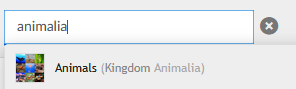

Description of problem:
Step 1: type anything into the search bar
Step 2: ctrl+click anywhere on any suggestion except the “View Observation” or “About” buttons
Expected behavior:
Either the relevant taxon page would open in a new tab (as used to be the case) or the observation grid for that taxon would open in a new tab (as now seems to be the default behavior of clicking a dropdown from the search menu. As an aside, was this change intentional? I really preferred the old functionality…)
Actual behavior:
Google.com opens in a new tab(???)
Note: this happens to me on multiple devices, even after disabling all browser extensions. Google is also neither my home page nor my default new tab page.